API

- class treebeard.models.Node(*args, **kwargs)
Bases:
ModelNode class
This is the base class that all tree models in this library inherit from.
Warning
Please be aware of the Known Caveats when using this library.
- delete(*args, **kwargs)
Removes a node and all it’s descendants.
Note
Call our queryset’s delete to handle children removal. Subclasses will handle extra maintenance.
- get_depth()
- Returns:
the depth (level) of the node
Example:
node.get_depth()
- is_child_of(node)
- Returns:
Trueif the node is a child of the supplied node, otherwiseFalse
Example:
node.is_child_of(node2)
- is_descendant_of(node)
- Returns:
Trueif the node is a descendant of the supplied node, otherwiseFalse
Example:
node.is_descendant_of(node2)
- is_sibling_of(node)
- Returns:
Trueif the node is a sibling of the supplied node, otherwiseFalse
Example:
node.is_sibling_of(node2)
- is_root()
- Returns:
True if the node is a root node (else, returns False)
Example:
node.is_root()
- is_leaf()
- Returns:
True if the node is a leaf node (else, returns False)
Example:
node.is_leaf()
- class treebeard.models.NodeManager(*args, **kwargs)
This is the base manager class for models subclassing
Node. It contains the bulk of Treebeard’s API for interacting with node objects.- add_root(create_kwargs=None, *, instance=None)
Adds a root node to the tree. The new root node will be the new rightmost root node. If you want to insert a root node at a specific position, use
add_sibling()in an already existing root node instead.- Parameters:
create_kwargs – dictionary of values to set on the model object.
instance – Instead of passing create_kwargs, you can pass an already-constructed (but not yet saved) model instance to be inserted into the tree.
- Returns:
the created node object. It will be save()d by this method.
- Raises:
NodeAlreadySaved – when the passed
instancealready exists in the database
Example:
MyNode.objects.add_root({"numval": 1, "strval"="abcd"})
Or, to pass in an existing instance:
new_node = MyNode(numval=1, strval='abcd')
MyNode.objects.add_root(instance=new_node)
- add_child(target, create_kwargs=None, *, instance=None)
Adds a child to the node. The new node will be the new rightmost child. If you want to insert a node at a specific position, use the
add_sibling()method of an already existing child node instead.- Parameters:
create_kwargs – dictionary of values to set on the model object.
instance – Instead of passing object creation data, you can pass an already-constructed (but not yet saved) model instance to be inserted into the tree.
- Returns:
The created node object. It will be save()d by this method.
- Raises:
NodeAlreadySaved – when the passed
instancealready exists in the database
Example:
MyNode.objects.add_child(node, {"numval": 1, "strval": "abcd"})
Or, to pass in an existing instance:
new_node = MyNode(numval=1, strval='abcd')
MyNode.objects.add_child(node, instance=new_node)
- add_sibling(target, pos=None, create_kwargs=None, *, instance=None)
Adds a new node as a sibling to the current node object.
- Parameters:
pos –
The position, relative to the current node object, where the new node will be inserted, can be one of:
first-sibling: the new node will be the new leftmost siblingleft: the new node will take the node’s place, which will be moved to the right 1 positionright: the new node will be inserted at the right of the nodelast-sibling: the new node will be the new rightmost siblingsorted-sibling: the new node will be at the right position according to the value of node_order_by
create_kwargs – dictionary of values to set on the model object.
instance – Instead of passing object creation data, you can pass an already-constructed (but not yet saved) model instance to be inserted into the tree.
- Returns:
The created node object. It will be saved by this method.
- Raises:
InvalidPosition – when passing an invalid
posparmInvalidPosition – when
node_order_byis enabled and theposparm wasn’tsorted-siblingMissingNodeOrderBy – when passing
sorted-siblingasposand thenode_order_byattribute is missingNodeAlreadySaved – when the passed
instancealready exists in the database
Examples:
MyNode.objects.add_sibling(node, "sorted-sibling", {"numval": 1, "strval": "abc"})
Or, to pass in an existing instance:
new_node = MyNode(numval=1, strval='abc')
MyNode.objects.add_sibling(node, "sorted-sibling", instance=new_node)
- move(node, target, pos=None)
Moves a node and all it’s descendants to a new position relative to another node.
- Parameters:
node – The node to move.
target – The node that will be used as a relative child/sibling when moving
pos –
The position, relative to the target node, where the current node object will be moved to, can be one of:
first-child: the node will be the new leftmost child of thetargetnodelast-child: the node will be the new rightmost child of thetargetnodesorted-child: the new node will be moved as a child of thetargetnode according to the value ofnode_order_byfirst-sibling: the node will be the new leftmost sibling of thetargetnodeleft: the node will take thetargetnode’s place, which will be moved to the right 1 positionright: the node will be moved to the right of thetargetnodelast-sibling: the node will be the new rightmost sibling of thetargetnodesorted-sibling: the new node will be moved as a sibling of thetargetnode according to the value ofnode_order_by
Note
If no
posis given the library will uselast-sibling, orsorted-siblingifnode_order_byis enabled.
- Returns:
None
- Raises:
InvalidPosition – when passing an invalid
posparmInvalidPosition – when
node_order_byis enabled and theposparm wasn’tsorted-siblingorsorted-childInvalidMoveToDescendant – when trying to move a node to one of it’s own descendants
PathOverflow – when the library can’t make room for the node’s new position
MissingNodeOrderBy – when passing
sorted-siblingorsorted-childasposand thenode_order_byattribute is missing
Note
The node can be moved under another root node.
Examples:
MyNode.objects.move(node, target=node2, pos='sorted-child')
MyNode.objects.move(node, target=node2, pos='prev-sibling')
- get_tree(parent=None)
- Returns:
A list of nodes ordered as DFS, including the parent. If no parent is given, the entire tree is returned.
- get_first_root_node()
- Returns:
The first root node in the tree or
Noneif it is empty.
Example:
MyNodeModel.objects.get_first_root_node()
- get_last_root_node()
- Returns:
The last root node in the tree or
Noneif it is empty.
Example:
MyNodeModel.objects.get_last_root_node()
- get_root_nodes()
- Returns:
A queryset containing the root nodes in the tree.
Example:
MyNodeModel.objects.get_root_nodes()
- get_ancestors(node)
- Returns:
A queryset containing the node’s ancestors, starting by the root node and descending to the parent. (some subclasses may return a list)
Example:
MyNode.objects.get_ancestors(node)
- get_children(node)
- Returns:
A queryset of all the node’s children
Example:
MyNode.objects.get_children(node)
- get_children_count(node)
- Returns:
The number of the node’s children
Example:
MyNode.objects.get_children_count(node)
- get_descendants(node, include_self=False)
- Returns:
A queryset of all the node’s descendants, doesn’t include the node itself if include_self is False.
Example:
MyNode.objects.get_descendants(node)
- get_descendant_count(node)
- Returns:
the number of descendants of a node.
Example:
MyNode.objects.get_descendant_count(node)
- get_first_child(node)
- Returns:
The node’s leftmost child, or None if it has no children.
Example:
MyNode.objects.get_first_child(node)
- get_last_child(node)
- Returns:
The node’s rightmost child, or None if it has no children.
Example:
MyNode.objects.get_last_child(node)
- get_first_sibling(node)
- Returns:
The node’s leftmost sibling. Can return the node itself if it was the leftmost sibling.
Example:
MyNode.objects.get_first_sibling(node)
- get_last_sibling(node)
- Returns:
The rightmost node’s sibling, can return the node itself if it was the rightmost sibling.
Example:
MyNode.objects.get_last_sibling(node)
- get_prev_sibling(node)
- Returns:
The node’s previous sibling, or None if it was the leftmost sibling.
Example:
MyNode.objects.get_prev_sibling(node)
- get_next_sibling(node)
- Returns:
The next node’s sibling, or None if it was the rightmost sibling.
Example:
MyNode.objects.get_next_sibling(node)
- get_parent(node, update=False)
- Returns:
the parent node of the supplied node object. Caches the result in the object itself to help in loops.
- Parameters:
update – Updates the cached value.
Example:
MyNode.objects.get_parent(node)
- get_root(node)
- Returns:
the root node for supplied node object.
Example:
MyNode.objects.get_root(node)
- get_siblings(node)
- Returns:
A queryset of all the node’s siblings, including the node itself.
Example:
MyNode.object.get_siblings(node)
- load_bulk(bulk_data, parent=None, keep_ids=False)
Loads a list/dictionary structure to the tree.
- Parameters:
bulk_data –
The data that will be loaded, the structure is a list of dictionaries with 2 keys:
data: will store arguments that will be passed for object creation, andchildren: a list of dictionaries, each one has it’s owndataandchildrenkeys (a recursive structure)
parent – The node that will receive the structure as children, if not specified the first level of the structure will be loaded as root nodes
keep_ids – If enabled, loads the nodes with the same primary keys that are given in the structure. Will error if there are nodes without primary key info or if the primary keys are already used.
- Returns:
A list of the added node PKs.
Note
Any internal data that you may have stored in your nodes’ data (
path,depth) will be ignored.Note
If your node model has
node_order_byenabled, it will take precedence over the order in the structure.Example:
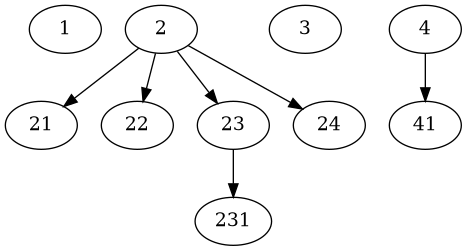
data = [{'data':{'desc':'1'}},
        {'data':{'desc':'2'}, 'children':[
          {'data':{'desc':'21'}},
          {'data':{'desc':'22'}},
          {'data':{'desc':'23'}, 'children':[
            {'data':{'desc':'231'}},
          ]},
          {'data':{'desc':'24'}},
        ]},
        {'data':{'desc':'3'}},
        {'data':{'desc':'4'}, 'children':[
          {'data':{'desc':'41'}},
        ]},
]
# parent = None
MyNodeModel.objects.load_bulk(data, None)
Will create:
- dump_bulk(parent=None, keep_ids=True)
Dumps a tree branch to a python data structure.
- Parameters:
parent – The node whose descendants will be dumped. The node itself will be included in the dump. If not given, the entire tree will be dumped.
keep_ids – Stores the pk value (primary key) of every node. Enabled by default.
- Returns:
A python data structure, described with detail in
load_bulk()
Example:
tree = MyNodeModel.objects.dump_bulk()
branch = MyNodeModel.objects.dump_bulk(node_obj)
- get_descendants_group_count(parent=None)
Helper for a very common case: get a group of siblings and the number of descendants (not only children) in every sibling.
- Parameters:
parent – The parent of the siblings to return. If no parent is given, the root nodes will be returned.
- Returns:
A list (NOT a Queryset) of node objects with an extra attribute: descendants_count.
Example:
# get a list of the root nodes
root_nodes = MyModel.get_descendants_group_count()

for node in root_nodes:
    print '%s by %s (%d replies)' % (node.comment, node.author,
                                     node.descendants_count)
- get_annotated_list(parent=None, max_depth=None)
Gets an annotated list from a tree branch.
- Parameters:
parent – The node whose descendants will be annotated. The node itself will be included in the list. If not given, the entire tree will be annotated.
max_depth – Optionally limit to specified depth
Example:
annotated_list = MyModel.objects.get_annotated_list()
With data:
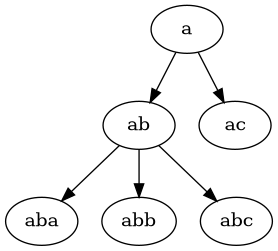
Will return:
[
    (a,     {'open':True,  'close':[],    'level': 0})
    (ab,    {'open':True,  'close':[],    'level': 1})
    (aba,   {'open':True,  'close':[],    'level': 2})
    (abb,   {'open':False, 'close':[],    'level': 2})
    (abc,   {'open':False, 'close':[0,1], 'level': 2})
    (ac,    {'open':False, 'close':[0],   'level': 1})
]
This can be used with a template like:
{% for item, info in annotated_list %}
    {% if info.open %}
        <ul><li>
    {% else %}
        </li><li>
    {% endif %}

    {{ item }}

    {% for close in info.close %}
        </li></ul>
    {% endfor %}
{% endfor %}
Note
This method was contributed originally by Alexey Kinyov, using an idea borrowed from django-mptt.
- get_annotated_list_qs(qs)
Efficiently generates an annotated list from a queryset.
The queryset MUST be ordered by path, otherwise it will yield incorrect results. The queryset must also represent the entirety of a branch of a tree: excluded objects will not be fetched and will result in gaps in the tree.